
AI Model
Mastering Visual Storytelling with DALL·E 3: A Professional Guide to Advanced Image Generation


- Share
- Tweet /data/web/virtuals/375883/virtual/www/domains/spaisee.com/wp-content/plugins/mvp-social-buttons/mvp-social-buttons.php on line 63
https://spaisee.com/wp-content/uploads/2025/07/elephant-1-1000x600.png&description=Mastering Visual Storytelling with DALL·E 3: A Professional Guide to Advanced Image Generation', 'pinterestShare', 'width=750,height=350'); return false;" title="Pin This Post">
Introduction: From Creator to Composer
You’ve explored the basics. You’ve learned to build structured prompts, balance clarity with creativity, and generate strong, coherent images with DALL·E 3. Now you’re ready to go deeper. This guide is for those who want to move from simply generating images to composing visual stories and unlocking the true potential of prompt engineering.
This is a hands-on, example-rich guide written for intermediate users of DALL·E 3—those who have read the first tutorial and now want to refine their craft with advanced techniques.
Each chapter will introduce a new skill, show you how it works in practice, and offer real prompts to try and adapt.
All examples are written for DALL·E 3.
Chapter 1: Composing Complex Scenes
What You Will Learn: How to describe scenes with multiple subjects, each with unique characteristics, and how to define spatial relationships.
Goal: Create images where several characters, objects, or elements coexist logically and visually.
How-To: Instead of writing a single sentence that tries to do everything, break your scene into logical segments. Use relational phrases like “to the left of,” “behind,” “in the distance,” and “in the foreground.” This gives DALL·E a hierarchy of composition to follow.
Ineffective Prompt: “A cat, a dog, and a boy in a forest.”
Improved Prompt: “In a sun-dappled forest, a small boy in a yellow raincoat walks along a muddy path. To his left, a shaggy brown dog runs ahead joyfully, while to his right, a curious tabby cat walks cautiously through the underbrush.”

Try this:
- Use directional terms: left, right, foreground, background, center
- Assign actions or expressions to individual characters
- Set a consistent time of day and lighting for unity
Chapter 2: Multi-Image Referencing
What You Will Learn: How to combine elements from multiple reference images into one cohesive scene.
Goal: Generate images that borrow specific visual elements (character design, background, styling) from other images.
How-To: If you’re using DALL·E inside ChatGPT, you can upload multiple images and reference them directly in your prompt. For example, you might say: “Use the character from image 1 and the environment from image 2.” Think like a creative director: instruct the AI on what to borrow from each image and how they should be combined.
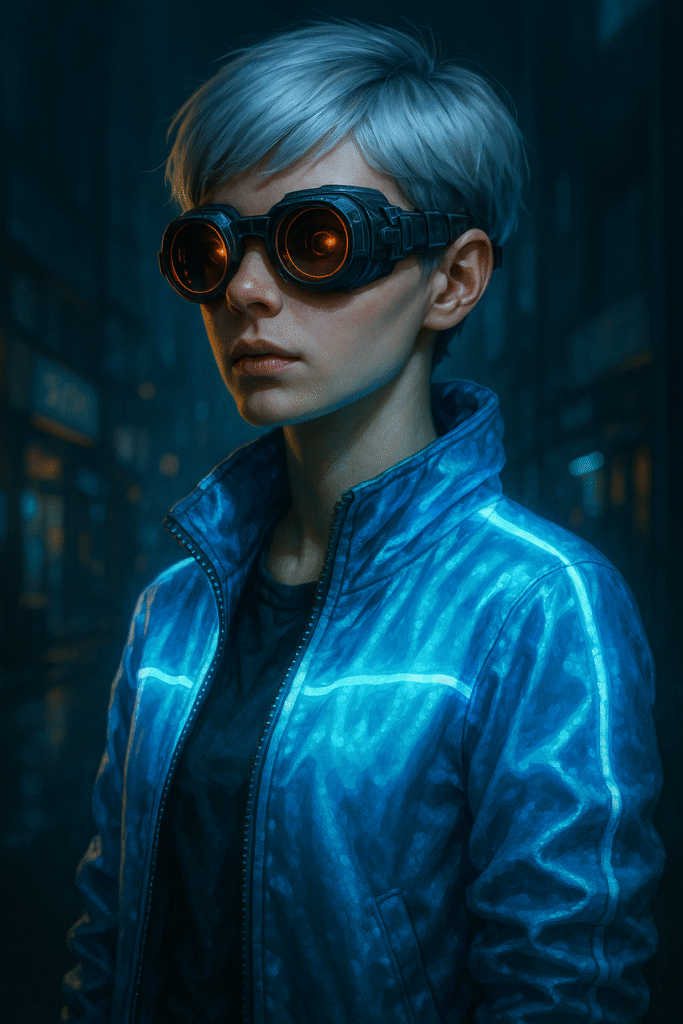
Prompt Example: “Take the young woman from the first image, with short silver hair, cyberpunk goggles, and a glowing blue jacket. Place her in the neon-lit Tokyo alleyway from the second image. Maintain the cinematic lighting and futuristic vibe of the alley while keeping her facial features and outfit from the original.”
Input image 1:
Input image 2:

Here is the resulting image that took the character from image 1 and the background from image 2. You need to copy all the images you are referencing into the prompt.

What to Try:
- Combine real photos and illustrations stylistically
- Borrow color palettes: “use the color scheme from a 90s comic book”
- Anchor characters with clear visual traits (hair, outfit, posture)
Chapter 3: Micro-Edits Without Edit Mode
What You Will Learn: How to change only a small detail in a scene without losing the rest.
Goal: Gain more granular control over revisions by anchoring context.
How-To: Since DALL·E doesn’t yet allow for pixel-precise edits outside of edit mode, you can mimic this behavior with prompt reinforcement. Describe the whole scene as it should be, then name only the detail you want to change.
This is the original image:

Prompt Example: “A man in a business suit stands on a New York rooftop at dusk, city lights glowing behind him. Keep the entire scene the same, but change his tie from black to dark red with yellow dots.”
The resulting image with a slight change:

Tip: Repeat the unchanged parts of the scene to reinforce them. DALL·E relies on verbal context.
Bad Prompt: “Same image, but change the tie color.”
Better Prompt: “Keep the same man, rooftop, lighting, and background. Only change the color of his tie from black to dark red with yellow dots.”
Chapter 4: Style Swapping While Preserving Composition
What You Will Learn: How to retain the scene but change the artistic style, mood, or visual tone.
Goal: Render one composition across different visual interpretations.
How-To: This is where DALL·E excels at “repainting” an image with a new visual language. Keep your prompt structure consistent, but swap out the style or emotional description.
Copy the original image into the prompt and request a style change.
Prompt Variations:
- “Same cottage and composition. Rendered in Studio Ghibli animation style.”
- “Same cottage and composition, but in photorealistic style with dramatic lighting.”
- “Same scene in watercolor style, evoking peaceful nostalgia.”
Original image:

The resulting image with the same scene in Ghibli style:

Style Phrases to Try:
- In the style of Gustav Klimt / Frank Frazetta / a Pixar short
- As a charcoal sketch / pixel art / manga
- Lit like a golden hour movie scene
Chapter 5: Panel and Window Composition
What You Will Learn: How to describe split scenes or multiple visual windows within one frame.
Goal: Create images that include multiple perspectives, panels, or visual frames.
How-To: Treat each window or panel as a mini scene with a title or descriptor. Be specific about position: top/bottom, left/right, panel 1/panel 2.
Prompt Example: “A comic-style layout with two horizontal panels. Top panel: a young woman opens a letter in a bright apartment. Bottom panel: the same woman reading the letter at a bus stop in the rain, her expression changed to concern.”
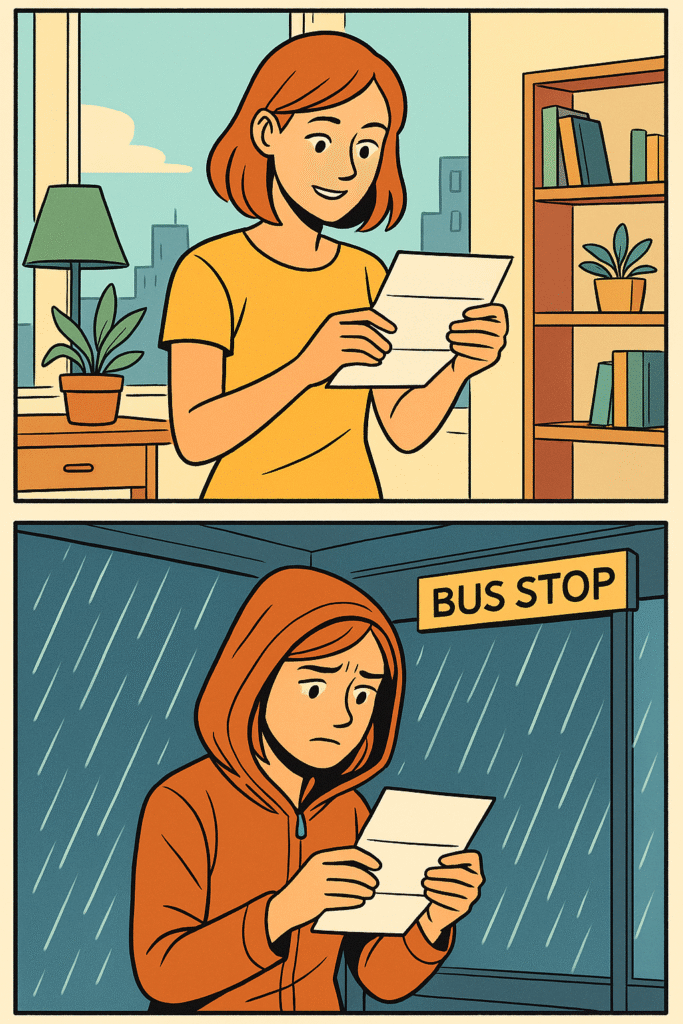
Variants:
- Use “before and after” structure
- Try triptychs for environmental storytelling
- Describe time progression within frames
Chapter 6: Prompt Chaining for Narrative Sequences
What You Will Learn: How to guide DALL·E through multi-step image creation using narrative logic.
Goal: Generate a series of images that evolve in content.
How-To: Use output from one image as the baseline for the next. Reiterate known elements and introduce new changes logically.
Example Series:
1) “A knight riding into a foggy forest.”
2) “Same knight, now standing before an ancient stone gate within the forest.”
3) “Same scene, now showing the gate opening, revealing a glowing blue chamber.”
Image 1:

Image 2:

Image 3:

Key Tactic: Reinforce continuity between steps with clear references.
Chapter 7: Prompt Weighting and Emphasis
What You Will Learn: How to subtly prioritize certain elements in your prompt.
Goal: Control which parts of a scene DALL·E emphasizes visually.
How-To: Although DALL·E doesn’t support weighted tokens like some models, you can simulate emphasis through repetition and elaboration.
Example Prompt: “A vast, VAST desert stretching endlessly under a pale sky. In the center, a tiny, weathered temple with crumbling pillars. The desert is the dominant feature.”

Alternatives:
- “Dominated by…”
- “Most of the image shows…”
- Repeat key ideas: “desert, sand dunes, horizon, dry, endless sand”
Chapter 8: Image Consistency Across a Series
What You Will Learn: How to generate multiple images that feature the same character, style, or visual language.
Goal: Create a set of images that feel narratively and visually cohesive.
How-To: Use fixed identifiers: “the same woman with auburn hair in a green leather jacket” or “a robot with a cracked glass eye and rusted steel arms.”
Repeat these identifiers in every image. Anchor clothing, posture, background tones.
Prompt Set:
- “The same teenage girl with curly black hair, oversized denim jacket, and round glasses, sitting on a rooftop at night.”
- “Same girl walking through a neon-lit street, holding a glowing drink, wearing the same denim jacket.”
Images 1 and 2:


Chapter 9: Using Negative Prompts (Implicit Control)
What You Will Learn: How to indirectly steer DALL·E away from unwanted features.
Goal: Improve image quality by filtering out problematic elements.
How-To: DALL·E doesn’t formally support negative prompts, but you can preempt unwanted features.
Example Prompt: “A clean, white ceramic kitchen with natural lighting. No people, no text, no logos.”

Phrases to use:
- “Without…”
- “Excludes…”
- “No visible…”
Chapter 10: Overcoming Biases and Defaults
What You Will Learn: How to spot and override DALL·E’s default outputs.
Goal: Avoid generic or stereotypical visuals.
How-To: DALL·E sometimes defaults to common interpretations: businesspeople in suits, European architecture, etc. Be culturally and visually explicit.
Weak Prompt: “An office worker sitting at a desk.”
Better Prompt: “A young Indian woman in a colorful sari working on a laptop in a sunlit co-working space in Mumbai, surrounded by plants and murals.”

Chapter 11: Photorealism vs. Surrealism
What You Will Learn: How to control realism level and creative exaggeration.
Goal: Direct DALL·E’s rendering style between grounded photography and imaginative art.
How-To: To push realism: “Photorealistic, natural lighting, DSLR clarity, 35mm depth of field.”
To push surrealism: “Dreamlike, impossible proportions, Salvador Dali style, floating elements.”
Prompt Test:
1) Realism: “A bowl of fresh fruit on a wooden table, soft morning light, shallow depth of field.”
2) Surrealism: “A floating bowl of fruit in a sky made of silk, with glowing birds circling around.”
Image 1:

Image 2:

Chapter 12: Defining Image Ratios and Aspect Orientation
What You Will Learn: How to suggest whether the image should be horizontal, vertical, or square, and what phrasing improves results.
Goal: Gain greater control over the image’s composition and framing, especially for posters, mobile art, and cinematic frames.
How-To: While DALL·E does not take explicit aspect ratio inputs through prompt text, phrasing can encourage it to interpret the scene with a certain orientation.
Common Phrasings to Try:
- “Cinematic wide shot”
- “Tall vertical illustration”
- “Poster format”
- “Square layout, centered subject”
Prompt Comparison:
- Default: “A wizard standing on a cliff during a lightning storm.”
- Horizontal framing: “A cinematic wide shot of a wizard standing on a cliff during a lightning storm, vast landscape spreading left and right.”
- Vertical framing: “A tall, vertical fantasy illustration showing a wizard on a cliff, towering storm clouds rising above him.”
Horizontal framing:

Vertical framing:

Try These Alternatives:
- Use real-world framing cues like “magazine cover,” “billboard format,” or “Instagram post style.”
- Mention camera angles like “overhead view” or “close-up portrait” to shape the image framing.
While it doesn’t guarantee an exact ratio, careful description of space and composition strongly influences the visual structure.
Chapter 13: Extracting and Applying Style from a Reference Image
What You Will Learn: How to analyze the visual characteristics of an existing image and use them to influence your own generations.
Goal: Recreate the style—not just the content—of a reference image, whether it’s from another artist, a film, or a previous generation.
How-To: Start by uploading a style reference image to ChatGPT. Then, describe the artistic attributes you want to extract from that image. These might include brush strokes, lighting, palette, composition, texture, line quality, or mood.
You can say things like:
- “In the style of image 1”
- “Apply the visual texture and lighting from the uploaded painting.”
- “Use the same color palette and brushwork as in the style reference.”
Use these phrases early in your prompt to establish the dominant influence.
Example Prompt: “Draw a mountain village at dusk in the style of Salvador Dalí, with melting shadows and surreal lighting as image 1.”
This is image 1 with the style that is to be copied.

Result image:

Advanced Tip: You can also describe the mood or emotional tone: “Apply the melancholic tone and high-contrast lighting from image 2.”
Common Style Cues to Observe:
- Color palette (pastel, high saturation, monochrome)
- Brushwork or texture (smooth gradients, oil strokes, pixel art, charcoal)
- Line work (clean outlines vs. sketchy)
- Composition (framed symmetrically, overhead views, close-ups)
Bad Prompt: “Make it like image 1.”
Better Prompt: “Use the color scheme, lighting contrast, and line style from image 1, but apply it to a sci-fi cityscape at night.”
Why It Works: You’re giving DALL·E specific visual traits to emulate rather than leaving it to guess what you mean by “like.”
This technique is extremely powerful when building series, brand visuals, or adapting moodboards into full scenes.
Chapter 14: Exploring Variations — Similar, Not Identical
What You Will Learn: How to prompt AI for a set of images that share a visual identity but aren’t repetitive.
Goal: Generate multiple original images in the same style and vibe, without duplicating the same composition or subject exactly.
The Problem:
You like an image the AI made—sort of. You want another one like it, but not a clone. Just “inspired by it.” This is a gray zone for AI models. If you’re too vague, it just copies. If you’re too specific, it locks into the same layout.
How-To:
Think like a concept artist exploring variations on a theme. Tell the AI what to keep and what to change. Emphasize style consistency while inviting compositional or subject diversity.
Prompt Formula:
“Create a new image in the same style as [the original image], with similar mood, color palette, and level of detail. Change the composition and subject slightly to feel like a different moment in the same world.”
Examples:
1) Base Prompt:
“A moody cyberpunk street at night with glowing signs, rain, and a lone figure.”
2) Variation Prompt:
“Another scene in the same cyberpunk world, same rainy atmosphere and glowing neon palette, but this time from inside a dimly lit ramen bar looking out onto the street. Keep the same visual style, but vary the composition.”
3) Another Variation:
“In the same gritty cyberpunk world, show a quiet alley behind the main street. Maintain the color tones and lighting style, but change the perspective and environment.”
Three images that maintain style consistency while differing in composition:
Image 1:

Image 2:

Image 3:

Key Phrases to Use:
- “Another image in the same style”
- “From the same world”
- “With similar colors and lighting”
- “Change the setting slightly”
- “Feels like a different moment, same atmosphere”
Tips:
- Mention what to keep (style, color, tone, vibe)
- Mention what to change (scene, angle, activity)
- Don’t just say “make it similar”—guide it by example
Avoid This:
“Make another one kind of like the last one.”
Use This Instead:
“Make a new image with the same dreamy watercolor style, pastel palette, and peaceful tone—but show a different village nestled in a mountain pass at twilight.”
Closing Thoughts
You now have the skills to turn DALL·E from a clever tool into a creative partner. These advanced strategies will help you unlock image generation with greater consistency, nuance, and purpose.
Each technique is best learned by iteration—start small, then scale. Explore themes, chain prompts, shift styles, or create entire narratives.
Your next image isn’t just a prompt away. It’s a direct result of your visual clarity and storytelling power.
Happy creating.
— Written by a prompt expert and graphic designer who believes words are the new paint.










When ByteDance released Seedance 2.0, the reaction was immediate and unusually intense, even by the standards of generative AI. The model did not simply produce another round of glossy, uncanny demo clips. It arrived with synchronized audio, multimodal prompting, cinematic camera movement, more stable characters, and a distribution path through CapCut and Dreamina that most rival AI video systems can only envy. Now, with Seedance 2.5 already in the release conversation, the question is no longer whether ByteDance has built an impressive AI video model. The question is whether Seedance is becoming the first truly mass-market AI video production layer.
From Viral Demo to Serious Creative Infrastructure
Seedance 2.0 represents a sharp shift in ByteDance’s AI video strategy. Earlier video models often impressed audiences for a few seconds, then collapsed under the weight of longer motion, repeated characters, awkward hands, mismatched sound, or inconsistent camera logic. Seedance 2.0 was designed to attack precisely those weaknesses. Its core pitch is not just better image quality, but a unified audio-video generation system that can accept text, images, video clips, and audio clips as inputs, then generate short videos with synchronized sound.
That matters because creators do not work with text prompts alone. A commercial team may have a product shot, a brand mood board, a sample voice, a storyboard frame, and a rough reference clip. A filmmaker may have a character design, a lighting reference, and a desired camera move. Seedance 2.0’s major upgrade is that it tries to treat those materials as part of the same creative instruction rather than separate assets stitched together after generation.
ByteDance says the model can handle up to nine images, three video clips, and three audio clips as reference inputs, while generating short audio-video outputs. The official model card places current direct generation in the 4-to-15-second range, with native 480p and 720p output for the open platform. In practice, that makes Seedance 2.0 less a full film generator than a high-end scene engine: a tool for advertisements, social clips, concept shots, pitch materials, stylized character motion, and rapid previsualization.
The most important improvement is control. AI video has often been dazzling but slippery. You could ask for a shot, but the model decided too much on its own. Seedance 2.0 is built around more directorial prompting: camera movement, lighting, emotion, rhythm, visual effects, motion references, and sound cues. That makes it more relevant to professional users who need repeatable results, not just one lucky generation.
What Seedance 2.0 Actually Upgraded
The most visible upgrade is motion stability. ByteDance has emphasized complex motion scenes, multi-subject interactions, and more physically plausible movement. This is a crucial frontier because human audiences forgive a strange texture faster than they forgive broken motion. A face can be slightly artificial and still pass in a social ad. A dancer’s leg sliding through the floor or a skater landing without weight immediately breaks the illusion.
Seedance 2.0 performs especially well when the task involves camera rhythm and short narrative structure. It can generate multi-shot clips, synchronize sound effects or dialogue more naturally than many earlier systems, and maintain a stronger sense of visual continuity. This is why the model attracted attention not only from AI hobbyists but also from filmmakers, advertisers, and short-form creators. It speaks the language of edited video, not just moving images.
Audio is the second major upgrade. In the first wave of AI video, sound was often an afterthought. Users generated silent clips, then added stock music, synthetic voice, or sound effects in a separate editing workflow. Seedance 2.0 moves closer to native audio-video generation. That means dialogue, sound effects, ambient cues, and music can be generated in relation to what is happening on screen. The result is not always perfect, and distortion can still occur, but the direction is strategically important. The winning AI video platform will not be the one that merely animates images. It will be the one that understands how image, motion, timing, and sound reinforce each other.
The third upgrade is multimodal reference control. Text-to-video is powerful, but it is inefficient for precise creative work. A brand does not want to describe a sneaker from scratch every time. A director does not want to repeatedly explain a character’s face, costume, and posture. Seedance 2.0’s ability to take several kinds of references gives it a more practical workflow. The user can show rather than describe. That is closer to how creative teams actually brief editors, animators, cinematographers, and motion designers.
The fourth upgrade is editing and extension. Seedance is not only a generator of fresh clips; it is moving toward a system that can modify existing video, continue a scene, and respond to targeted instructions. This is where the model becomes more than a novelty. A creator who generates one good shot but cannot revise it has a toy. A creator who can change the background, extend the scene, adjust motion, preserve a subject, and refine the sound has the beginning of a production tool.
Seedance 2.5: The Upgrades Everyone Is Watching
The latest discussion now centers on Seedance 2.5, which ByteDance’s Volcano Engine ecosystem has positioned as the next step beyond impressive short clips. The headline upgrade is native 30-second video generation. That may sound like a simple doubling of length, but in video AI it is a much deeper technical jump.
Five seconds can hide a lot. Fifteen seconds can support a strong visual idea. Thirty seconds begins to resemble a usable ad, a short drama beat, a product demo, a trailer moment, or a complete social video. The challenge is temporal coherence. Over longer clips, AI systems must preserve characters, objects, lighting, spatial layout, motion logic, and camera intent. The longer the clip, the more opportunities there are for faces to drift, props to mutate, backgrounds to flicker, or physics to quietly fail.
Seedance 2.5 is expected to push the model toward longer, more coherent production-style output. Reports around the release window point to native 30-second clips, 4K output, up to 50 multimodal references, and region-level editing. The reference expansion is especially important. Moving from a handful of inputs to dozens of references would change how teams build scenes. A campaign could feed in product angles, color palettes, talent references, camera samples, storyboard panels, audio references, and brand assets in a single workflow. Instead of relying on one prompt to carry the entire creative burden, the model becomes a more structured production partner.
Region-level editing may prove just as important as longer generation. AI video systems are frustrating when one small problem forces a full regeneration. If a logo is wrong, a hand is broken, a background object appears out of place, or a character expression misses the tone, creators need surgical control. The ability to modify part of a frame or scene without destroying the entire shot is essential for professional adoption.
The public rollout, however, remains a moving target. As of early July 2026, the safest reading is that Seedance 2.5 has been announced or previewed, with enterprise beta activity and public access expected in stages rather than universally available at once. That distinction matters. AI video markets are full of “available soon” claims that blur demos, closed betas, API previews, and real consumer access. For creators planning production pipelines, Seedance 2.0 is the current practical model. Seedance 2.5 is the upgrade to watch, but not yet a stable baseline for every user.
Users Are Impressed, but Not Unreservedly Satisfied
User satisfaction around Seedance 2 is best described as polarized. On the creative side, the excitement is real. Early beta feedback highlighted prompt adherence, realistic movement, lighting quality, audio sync, and the usefulness of the model in ideation. Many creators see Seedance as one of the first AI video tools that can produce clips with enough visual energy to compete with edited social content. The viral reaction has been driven by exactly that: Seedance clips often look less like technical demos and more like fragments of actual entertainment.
But satisfaction is not the same as awe. The model can impress users while still frustrating them. Public reviews around Dreamina and CapCut-related experiences are mixed, with complaints often focusing less on raw generation quality and more on platform issues such as billing, credits, watermarks, access limits, and unclear expectations. Small review samples are not enough to define the whole user base, but they do show a familiar pattern in generative AI: users may love the output potential while disliking the commercial wrapper around it.
There is also a creative frustration. Seedance 2.0 is better at motion and coherence than many competitors, but it still makes errors. Characters can drift. Detail stability is not perfect. Audio can distort. Text rendering is not consistently reliable. Multi-subject scenes remain difficult. Longer narrative continuity still requires human editing and careful shot planning. The best Seedance results circulating online often involve skilled prompting, multiple attempts, curation, and post-production. They are not proof that anyone can type one sentence and receive a finished film.
The deeper issue is trust. Users are enthusiastic about what Seedance can create, but professional users also need confidence that a tool will be reliable, legal, and controllable. That confidence was shaken by the copyright controversy surrounding the model’s early release. Clips featuring recognizable celebrities and copyrighted characters created immediate backlash from Hollywood groups, studios, and performers’ representatives. ByteDance later emphasized safeguards against unauthorized likeness and intellectual property use, especially during the CapCut rollout. Still, the incident shaped perception. For some users, Seedance is a breakthrough. For others, it is a warning sign about how fast AI video can collide with rights, consent, and creative labor.
How Many Users Does the Platform Have?
The cleanest answer is that ByteDance has not publicly disclosed a standalone monthly active user number for Seedance itself. That is important because “Seedance users,” “Dreamina users,” “CapCut users,” and “ByteDance AI users” are not the same thing.
The platform advantage comes from CapCut. CapCut is one of the world’s largest video editing apps, and a16z reported it at 736 million monthly active mobile users. That does not mean 736 million people are using Seedance 2.0. It means ByteDance has a distribution channel of extraordinary scale if Seedance is integrated deeply into CapCut and Dreamina workflows.
This is the strategic difference between ByteDance and many AI video competitors. OpenAI, Google, Runway, Kuaishou, Alibaba, PixVerse, and others may build powerful models, but ByteDance already owns a creator platform that millions of people use to edit, caption, remix, and publish videos. CapCut users are already in the workflow. They are not visiting an AI lab out of curiosity; they are making content. That makes Seedance dangerous in market terms. The fastest path to adoption is not always the best model in isolation. It is the best model embedded where creators already work.
Dreamina adds another layer. It gives ByteDance a more AI-native creative surface, while CapCut gives it mainstream editing distribution. For casual creators, Seedance can appear as a feature inside an existing tool. For advanced users, it can become part of a dedicated AI generation workflow. For businesses and developers, BytePlus and Volcano Engine create a path toward API and enterprise use.
This multi-channel strategy is why Seedance matters beyond benchmarks. A model can top a leaderboard and still fail commercially if users cannot access it, afford it, or integrate it. ByteDance is trying to solve the distribution problem and the workflow problem at the same time.
Is Seedance 2.0 the Best AI Video Model on the Market?
The honest answer is: in some categories, yes; overall, not unconditionally.
Artificial Analysis currently ranks Dreamina Seedance 2.0 720p at the top among text-to-video models with audio and image-to-video models with audio. It also leads image-to-video without audio, while text-to-video without audio is led by HappyHorse-1.0, with Seedance still among the top group. These leaderboards are based on blind user preference comparisons, which makes them useful because they reflect what people prefer when judging outputs directly.
But leaderboards do not settle the entire market. AI video quality depends heavily on the prompt, the desired style, the output format, whether audio matters, how much control the user needs, and whether the workflow requires editing, character consistency, or commercial safety. A model can win on cinematic motion and lose on reliability. It can dominate short clips and struggle with longer continuity. It can generate beautiful shots while failing legal or brand-safety requirements.
Seedance 2.0’s strongest case is native audio-video generation, prompt-driven cinematography, multimodal reference use, and short-form visual impact. It feels especially strong for social ads, concept scenes, stylized storytelling, product visualization, creator content, and fast previsualization. Its weakness is not that the model is unimpressive. Its weakness is that professional production demands a complete system: rights management, repeatability, editing precision, cost predictability, team collaboration, resolution, and platform reliability.
Seedance may be one of the best models available today for generating compelling short audio-video clips. It is not yet a universal replacement for production teams, nor is any competitor. The market is still too young, too unstable, and too use-case dependent for a single winner.
The Competitors: Sora, Veo, Kling, Runway, HappyHorse, PixVerse and Open Models
Seedance’s rise has to be understood inside a much wider AI video race.
OpenAI’s Sora 2 remains one of the most visible competitors, especially because OpenAI understands consumer product design and social distribution. Sora’s strength is narrative realism, creator-friendly sharing, and the broader OpenAI ecosystem. It is not just a model; it is a cultural product. That matters because AI video is partly a technical market and partly an attention market.
Google’s Veo 3 and Veo 3.1 are formidable on visual quality, prompt understanding, and enterprise credibility. Google also benefits from integration across Gemini, YouTube-adjacent workflows, cloud infrastructure, and professional media relationships. Veo’s advantage may be less about viral chaos and more about controlled, high-trust generation for brands, agencies, and businesses that need guardrails.
Kuaishou’s Kling 3.0 is another major competitor, particularly strong in motion quality, character animation, and creator adoption. Kling has repeatedly been treated as one of the most practical AI video tools for users who want strong movement and accessible workflows. For many creators, Kling may feel easier or more predictable than Seedance, even if Seedance wins on specific audio-video benchmarks.
Runway remains important because it has focused on creative professionals for longer than most rivals. Its strength is not only generation, but editing, visual effects workflows, and a user base of artists who already think in production terms. Runway’s challenge is distribution at ByteDance scale. ByteDance has CapCut. Runway has professional credibility. Those are different advantages.
Alibaba’s HappyHorse has emerged as a serious benchmark competitor, particularly in text-to-video without audio. That makes it one of the models to watch closely. If HappyHorse continues improving while Alibaba connects it to broader cloud, commerce, and content infrastructure, it could become a major force in China and beyond.
PixVerse, Wan, LTX, HunyuanVideo, and other open or semi-open systems also matter because not every creator wants a locked proprietary tool. Open-weight and API-friendly models can become attractive for studios, startups, and developers who need customization, cost control, or local experimentation. They may not always beat Seedance on raw preference rankings, but they can win in flexibility.
The real market is therefore not “Seedance versus one rival.” It is a layered race between consumer apps, professional tools, enterprise APIs, open models, editing platforms, and rights-safe commercial systems.
Copyright Is Not a Side Issue
The copyright backlash around Seedance 2.0 is not a footnote. It is central to the future of AI video. The model went viral partly because users generated clips involving recognizable characters and celebrity likenesses. That created immediate legal and reputational pressure. Reuters reported that ByteDance had suspended parts of its global launch plan after disputes with major studios, while ByteDance said it would strengthen safeguards.
For everyday users, restrictions can feel annoying. A creator wants to test a reference face, a famous character style, or a recognizable cinematic universe. For studios, actors, and rights holders, the same capability looks like mass infringement at machine speed. For platforms, it creates a liability problem. For advertisers, it creates brand-safety risk.
This is why Seedance 2.5’s rumored or reported connection to licensed IP workflows is strategically important. The long-term solution for AI video may not be looser prompting. It may be licensed generation: approved characters, approved styles, revenue sharing, consent-based likeness use, and traceable provenance. If ByteDance can combine high-quality generation with legal creative templates, it could turn a controversy into a business model.
The same challenge applies to every competitor. OpenAI, Google, Runway, Kling, and others all face the same pressure. The best model will not merely be the one that generates the most convincing celebrity imitation. It will be the one that gives users enough creative power while keeping platforms, brands, artists, and rights holders inside a workable legal framework.
What Seedance Means for Creators and Businesses
For creators, Seedance 2.0 changes the economics of experimentation. A short-form producer can test visual concepts faster. A small brand can prototype campaign ideas without booking a studio. A filmmaker can explore camera language before committing to a shoot. A game team can create mood sequences or animated world concepts. A media team can create social-first visual assets with less manual editing.
But the tool does not eliminate creative judgment. In fact, it increases the value of taste. When anyone can generate motion, the scarce skill becomes knowing what to generate, which result to keep, how to refine it, how to edit it, and how to avoid generic AI aesthetics. Seedance can lower production friction, but it cannot define a brand voice or invent a compelling story on its own.
For businesses, the opportunity is speed. Product demos, localized ads, internal communications, social variants, pitch videos, and concept tests can all move faster. The risk is inconsistency. Companies will need guidelines for prompts, brand assets, legal approvals, watermark policies, disclosure, and quality control. AI video will not simply enter marketing departments as a magic button. It will enter as a new production layer that needs governance.
For agencies and studios, Seedance is both useful and disruptive. It can accelerate previsualization and reduce low-level production costs. It can also pressure traditional service models built around manual iteration. The likely outcome is not that AI video instantly replaces professional teams. It is that professional teams using AI video will outpace teams that refuse it.
The Verdict: Seedance Is a Front-Runner, Not a Finished Revolution
Seedance 2.0 is one of the strongest AI video models on the market, especially where synchronized audio, multimodal prompting, short-form cinematic output, and motion stability matter. Its leaderboard performance supports the hype, and its integration into CapCut and Dreamina gives ByteDance a distribution advantage that few competitors can match.
Yet the model is not flawless, and the platform story is still complicated. Standalone Seedance user numbers are not public. User satisfaction is enthusiastic but uneven. Reviews and community discussions point to friction around credits, watermarks, platform policies, and expectations. The copyright controversy remains a serious constraint. Seedance 2.5 promises major upgrades, but public access and independent testing still need to catch up with the claims.
The most realistic conclusion is that Seedance is not simply “the best AI video model” in a permanent sense. It is one of the leading systems in a market that is changing almost monthly. Its biggest advantage may not be technical alone. It is the combination of model quality, audio-video generation, creator workflow, and ByteDance distribution.
If Seedance 2.5 delivers 30-second coherent clips, richer references, 4K output, and precise editing at scale, ByteDance could move AI video from viral spectacle into everyday production. That would not end the competition. It would raise the floor for everyone else. Sora, Veo, Kling, Runway, HappyHorse, PixVerse, and open models will all keep pushing. But Seedance has already forced the market to respond.
The next phase of AI video will not be won by demo clips. It will be won by the platform that gives creators control, gives businesses legal confidence, gives users predictable value, and turns generation into a repeatable workflow. Seedance 2.0 has made ByteDance a front-runner in that race. Seedance 2.5 will show whether it can stay there.
Claude Sonnet 5 arrives at a moment when web design no longer means what it meant even two years ago. The modern designer is not simply arranging pixels, and the modern front-end developer is not simply translating mockups into components. The work now lives in the messy middle: brand systems, responsive logic, conversion copy, accessibility, micro-interactions, analytics hooks, authentication flows, design handoff, and the constant pressure to ship something polished before the market moves on. That is exactly where Anthropic wants Claude Sonnet 5 to matter. The question is not whether it can generate a decent landing page. Many models can do that. The real question is whether it can compress the entire web design cycle enough to feel meaningfully different. The answer is yes, with an important caveat: Claude Sonnet 5 looks genuinely efficient for web design when the task is structured, iterative, and tied to real product work. It is less convincing when “design” means pure taste, original brand direction, or final creative judgment.
The Efficiency Claim Is Not Just About Speed
When people call an AI model “efficient,” they often mean it responds quickly or costs less per token. That is part of the story, but for web design it is not the whole story. A cheap model that produces five broken pages is not efficient. A fast model that needs constant correction is not efficient. A visually impressive prototype that collapses when connected to real data is not efficient either.
Claude Sonnet 5’s efficiency claim is more interesting because it is tied to agentic behavior. Anthropic describes the model as its most agentic Sonnet model yet, designed to plan, use tools such as browsers and terminals, and operate across multi-step workflows that previously required larger, more expensive models. For web design, that distinction matters. The bottleneck in professional web work is rarely a single HTML section. It is the chain of decisions between a vague idea and a usable interface.
A typical web project requires someone to turn a brief into a structure, turn the structure into a screen, turn the screen into responsive states, turn the responsive states into maintainable code, test the result, fix the obvious bugs, refine the copy, and then repeat the process after feedback. Earlier AI coding tools were helpful in pieces. They could write a component, suggest layout ideas, or explain why a build failed. The promise of Sonnet 5 is that it can stay with the job for longer, rather than dropping the thread halfway through.
That is why the “crazy efficient” label is not totally misplaced. If a model can reliably maintain context across a design system, a component library, a product requirement, and a codebase, efficiency compounds. It is not saving thirty seconds on a button. It is removing handoff friction from the whole workflow.
Why Web Design Is a Perfect Test Case
Web design is one of the harshest practical tests for a general-purpose AI model because it blends subjective and objective work. A web page can compile and still be ugly. It can look beautiful and still be unusable. It can satisfy a prompt and still violate accessibility rules. It can match a screenshot but fail on mobile. It can follow brand colors while missing the emotional tone of the product.
This is why web design exposes the difference between simple code generation and useful production assistance. A model that merely writes Tailwind classes is not enough. The better model understands hierarchy, state, rhythm, spacing, progressive disclosure, navigation logic, conversion intent, content structure, and implementation constraints. It also knows when to ask whether a modal should really be a modal, whether a hero section needs three calls to action, or whether the dashboard table should become cards on mobile.
Claude models have historically been strong at long-form reasoning and structured output, which helps in this kind of work. Sonnet 5 appears to push that further by improving the model’s ability to pursue a plan. In web design, that can mean creating a landing page and then remembering to add empty states, error states, keyboard navigation, analytics events, loading skeletons, and a sensible component breakdown. Those details are where teams usually lose time.
The model’s advantage is not that it has taste superior to a senior designer. It does not. The advantage is that it can keep generating plausible, organized, technically coherent options at high speed. In the early and middle stages of web design, that is often enough to change the economics of the project.
From Prompt to Prototype, the Real Gain Is Iteration
The most obvious use case is prompt-to-prototype. Give Claude Sonnet 5 a description of a SaaS homepage, a crypto dashboard, a checkout flow, a developer documentation portal, or an AI product landing page, and it can produce a coherent first pass. That first pass will usually include a layout, copy, visual hierarchy, sections, interaction states, and front-end code. In tools that support previews or artifacts, the user can inspect the result directly rather than reading static code.
But the first pass is not where the value peaks. The value appears in the second, third, and fourth pass. Web design is rarely a straight line. A founder asks for “more premium.” A designer says the spacing feels generic. A developer says the component structure will be annoying to maintain. A marketer says the hero is not explaining the product fast enough. A product manager asks for a second version aimed at enterprise buyers. Traditionally, each of those comments creates another loop between tools and people.
Sonnet 5 is efficient because it can absorb those changes conversationally and apply them across a whole artifact or codebase. Ask it to make the pricing page feel more enterprise-grade, reduce visual noise, add a comparison table, preserve the existing design tokens, and make the mobile version less cramped. The model can revise the page in one pass, or at least get close enough that the human reviewer is editing rather than rebuilding.
That is a very different experience from using AI as a snippet machine. The best web design workflows with Sonnet 5 treat it less like a junior developer waiting for isolated tickets and more like a tireless design engineer who can be given a direction, a constraint, and a repo.
The Claude Design Connection
Claude Sonnet 5 also lands in a broader Anthropic product context. Claude Design, introduced earlier in 2026 as a research preview, is aimed directly at visual creation, prototypes, wireframes, decks, mockups, marketing collateral, and design-system-aware exploration. It can ingest brand context, work from prompts or files, refine through conversation, and hand off to Claude Code. That matters because the web design question is not only about the raw model. It is about the workflow around the model.
For many teams, the future stack may look less like “designer makes Figma file, engineer recreates it” and more like “team explores in a generative design workspace, exports or hands off the winning direction, and then uses an agentic coding tool to turn it into shippable front-end work.” Sonnet 5 fits naturally into that shift because it is built for the execution layer. It may not replace a dedicated design model or a human creative director, but it can carry a design idea into working code with less translation loss.
This is especially relevant for small teams. A solo founder or two-person startup often cannot afford separate specialists for UX, brand, front-end architecture, and copy. Sonnet 5 does not magically supply all of those skills at senior level, but it gives a small team a credible baseline across them. A founder can ask for three homepage directions, choose one, turn it into a React page, request mobile refinements, generate onboarding screens, and then ask for a component map. That does not eliminate design expertise, but it reduces the penalty for not having a full design department on day one.
For agencies, the benefit is different. The agency does not need AI to make “a website.” It needs faster exploration, faster alternates, faster presentation assets, and faster conversion of approved concepts into front-end scaffolds. Sonnet 5 is valuable when it becomes a multiplier for senior staff, not a replacement for them.
Where It Feels “Crazy Efficient”
The model feels most efficient in four web design scenarios.
The first is high-volume landing page production. Marketing teams constantly need pages for product launches, webinars, reports, token campaigns, waitlists, feature announcements, and paid acquisition tests. These pages often share patterns: hero, social proof, product explanation, CTA, FAQ, pricing, lead form, and legal footer. Sonnet 5 can generate these quickly and adapt them to different audiences. The efficiency comes from producing usable variants without starting from a blank canvas every time.
The second is design-system implementation. If a team already has components, tokens, naming conventions, and layout rules, Sonnet 5 can work inside those constraints. That is when the model becomes far more useful. Instead of inventing random styling, it can reuse real components, follow existing conventions, and produce code that looks like it belongs in the product. This is one of the biggest differences between impressive demos and professional work. AI-generated web pages are easy. AI-generated web pages that fit your existing product are harder. Sonnet 5’s long-context and agentic strengths are relevant here.
The third is conversion from rough idea to interactive prototype. Product teams often need to test a flow before committing engineering resources. Sonnet 5 can help build clickable prototypes, dashboard shells, onboarding flows, settings pages, and admin screens rapidly. The result may not be final production code, but it can be good enough for internal review, user testing, investor demos, or stakeholder alignment. That has real economic value because it shortens the path from conversation to something people can react to.
The fourth is front-end debugging and refinement. Web design work does not end when the page looks right on a large screen. Someone has to fix overflow, hydration errors, broken component props, inconsistent spacing, missing aria labels, theme mismatches, and layout regressions. Sonnet 5’s coding improvements matter here because design efficiency is often lost in cleanup. A model that can inspect, modify, test, and iterate through a codebase is far more useful than one that only creates the initial mockup.
The Cost-Performance Argument
Sonnet 5’s strongest business case is not that it is the most powerful Claude model. Anthropic positions higher-tier models such as Opus and Fable for more demanding work. The argument for Sonnet 5 is that it offers a strong balance of intelligence, speed, and cost. That balance is exactly what web design teams need because design iteration can burn through a large amount of model usage.
A one-off prompt does not reveal much about cost. Real design work involves many turns. You ask for a page. Then you ask for a more premium version. Then you ask for mobile fixes. Then you paste errors. Then you ask it to split the page into components. Then you ask for a light theme. Then a dark theme. Then accessibility improvements. Then copy changes. Then integration with a form library. The costs compound across iterations.
A model that is close enough to a flagship for most front-end tasks but cheaper to run can be more practical than the absolute best model. This is the classic middle-model advantage. You reserve the most expensive model for the hardest architecture, strategy, or ambiguous debugging tasks, while using Sonnet for the bulk of high-throughput production. In web design, where most work is iterative rather than singularly profound, that may be the right trade.
This is why Sonnet 5 could become a default model for design engineering workflows. Not because it wins every benchmark, but because it lives in the zone where capability and cost meet day-to-day usage.
Benchmarks Help, But They Do Not Settle the Design Question
The early numbers around Sonnet 5 are encouraging for coding and agentic tasks. Its reported improvements over Sonnet 4.6 on agentic coding, terminal work, tool use, and computer-use-style evaluations suggest a model better suited to multi-step execution. That supports the idea that it can help with front-end development and web design implementation.
Still, benchmarks do not fully answer whether a model is good at web design. A software benchmark might reward resolving a GitHub issue, passing tests, or completing terminal tasks. Those are important, but web design quality also includes taste, clarity, emotional fit, information hierarchy, and how well the page communicates a product’s promise. There is no simple benchmark for whether a pricing page feels trustworthy or whether a fintech dashboard reduces cognitive load.
This is where users should be careful with hype. Sonnet 5 can be highly efficient without being a complete design authority. It can produce many competent directions, but a human still needs to select the right one. It can follow a design system, but someone needs to define that system. It can improve accessibility, but someone should still audit the result. It can write persuasive copy, but someone needs to know whether that copy is true, compliant, and strategically sound.
In short, benchmarks support the efficiency story, but they do not replace product judgment.
The Difference Between “Good Design” and “Shippable Design”
One of the most common mistakes in AI web design is confusing visual completeness with shipping readiness. A generated page can look finished in a screenshot while hiding serious problems. The layout might not survive real content. The components might be too tightly coupled. The colors might fail contrast checks. The animation might hurt performance. The design might ignore localization. The copy might overpromise. The form might lack validation. The page might be inaccessible to keyboard users. The generated code might introduce dependencies the team does not want.
Claude Sonnet 5 reduces some of these risks because it is better at sustained, technical work than earlier mid-tier models. It can be asked to audit its own output, refactor components, add tests, check accessibility concerns, and align with conventions. But it does not eliminate review. It makes review more important because the volume of output increases.
This is the paradox of efficient AI design. The faster the system generates, the more valuable human judgment becomes. The human’s role shifts from producing every artifact manually to directing, filtering, testing, and approving. A designer becomes more like an editor and systems thinker. A front-end developer becomes more like an architect and reviewer. A product manager becomes more responsible for asking sharper questions.
Sonnet 5 is efficient when that human-in-the-loop model is working. It is dangerous when teams treat generated output as automatically production-ready.
How It Changes the Designer’s Role
For designers, Sonnet 5 is both useful and uncomfortable. It automates parts of the work that used to signal craft: rapid layout exploration, visual variants, first-pass copy, and interactive prototypes. A designer who once spent hours creating options can now generate a broad field of possibilities in minutes.
But the deeper design role remains intact. Good designers do not merely generate screens. They understand users, constraints, market positioning, brand emotion, and the difference between a page that looks modern and a page that changes behavior. Sonnet 5 can propose a dashboard layout, but it does not know the political context inside an enterprise customer’s procurement team. It can create a crypto exchange landing page, but it does not inherently know what level of risk disclosure is appropriate for a regulated market. It can design an AI assistant onboarding flow, but it does not automatically understand where user trust breaks down.
The designers who benefit most will be those who can direct the model with precision. Instead of asking for “a better homepage,” they will ask for a version that increases trust for security-conscious CTOs, reduces hero-section abstraction, uses fewer gradients, foregrounds compliance proof, and keeps the existing component system intact. That kind of prompt is design direction. The model supplies acceleration, not taste leadership.
How It Changes the Front-End Developer’s Role
For front-end developers, Sonnet 5 may be even more disruptive. It can generate components, refactor layouts, diagnose errors, wire up state, and work through multi-file changes. In the context of web design, that means developers may spend less time translating obvious UI patterns and more time enforcing architecture, performance, maintainability, and integration quality.
The most productive use is not to ask Sonnet 5 to create a full app blindly. It is to give it a real repo, clear constraints, and a narrow objective. For example, “Create a responsive pricing comparison page using our existing Card, Button, Badge, and Toggle components. Do not add new dependencies. Match the spacing scale in theme.ts. Include monthly and annual states. Add accessible labels. Keep the copy neutral and enterprise-focused.” That is the kind of instruction that turns the model into a practical collaborator.
The weaker approach is to ask for “a beautiful SaaS website” and accept whatever comes back. That may produce a polished demo, but it usually creates cleanup work later. Sonnet 5 rewards specificity. The more context it has about the system, the better its efficiency becomes.
The Web Design Sweet Spot: Design Engineering
The role most obviously amplified by Sonnet 5 is the design engineer. Design engineering sits between visual design and front-end implementation. It cares about how things look, how they behave, and how they are built. It is the discipline of turning ideas into interfaces that feel good and survive production.
Sonnet 5 is well aligned with that role because it can move between language, structure, and code. It can write UX copy, generate a component hierarchy, propose interaction logic, implement a responsive layout, and then explain the trade-offs. It is not perfect at any one of those tasks, but it is unusually useful across all of them.
This cross-functional flexibility is the source of the efficiency. A specialist tool might beat Sonnet 5 in a narrow area. A dedicated visual design platform may offer better canvas control. A specialized code model may outperform it on certain programming tasks. A human copywriter may produce sharper messaging. But Sonnet 5 can carry context across these boundaries. For teams trying to move quickly, that connective tissue matters.
What It Still Gets Wrong
Despite the excitement, Sonnet 5 is not a magic web designer. It can still produce generic aesthetics. It may default to familiar SaaS visual tropes: glowing gradients, rounded cards, oversized hero text, vague productivity claims, dashboard mockups, and testimonial blocks that feel interchangeable. Without strong direction, AI web design often converges on the same polished sameness.
It can also overbuild. Ask for a simple page, and it may create an elaborate component system. Ask for an animation, and it may add unnecessary complexity. Ask for a dashboard, and it may invent data structures that look plausible but do not match the product. This is not always a failure of intelligence. It is a failure of constraint. AI models tend to fill gaps with probability. Professional design often requires refusing unnecessary elements.
There are also risks around dependencies and maintainability. Even strong coding models may suggest libraries a team does not use, create inconsistent patterns, or produce code that works in isolation but does not match the repo’s long-term architecture. For production web design, teams should require dependency discipline, accessibility checks, responsive testing, and code review.
Finally, brand originality remains a human challenge. Sonnet 5 can apply a brand system, but inventing a distinctive brand from scratch is a different problem. It can generate options, but the decision about what a company should feel like belongs to people who understand the market, the audience, and the stakes.
The Best Way to Use It for Web Design
The most efficient Sonnet 5 workflow starts with context, not a blank prompt. Give it the product positioning, target audience, design system rules, examples of existing pages, technical stack, and business goal. Then ask for a plan before asking for code. This lets the model expose its assumptions early.
The next step is constrained generation. Instead of requesting a whole website, ask for one page or one flow. Then ask for variants with clear differences. One version might optimize for enterprise trust. Another might optimize for developer adoption. A third might optimize for consumer simplicity. This creates useful creative range without turning the process into chaos.
After selecting a direction, ask the model to implement using existing components and no new dependencies unless approved. Then ask it to audit the result for accessibility, mobile layout, performance, and consistency with the original goal. Finally, have a human review the output as if reviewing a pull request from a capable but overly eager teammate.
That last phrase is the right mental model. Claude Sonnet 5 is not an intern. It is too capable for that comparison. But it is also not a creative director, product owner, and senior engineer rolled into one. Treat it as a fast design engineer that needs direction and review, and the efficiency gains become real.
Is It Worth Switching From Older Sonnet Models?
For web design work, the case for switching from older Sonnet models is strong. The improvements in agentic behavior, coding, tool use, and sustained execution are directly relevant to front-end workflows. If a previous model could generate a nice component but struggled to carry changes across a page, Sonnet 5’s better follow-through should be noticeable.
The more interesting comparison is with higher-tier models. Should teams use Opus or Fable instead? For the hardest tasks, maybe. If the work involves deep architecture, extremely ambiguous debugging, complex product reasoning, or high-stakes enterprise systems, a stronger model may justify the higher cost. But for everyday web design iteration, Sonnet 5 looks like the more practical default. It is strong enough for most tasks and efficient enough for repeated use.
That matters because web design is not a single genius moment. It is a sequence of small decisions. The best model for that workflow is not always the most powerful model. It is the model you can afford to use repeatedly without hesitation.
The Verdict
So, is Claude Sonnet 5 really crazy efficient for web design? Yes, if by web design you mean the modern, practical workflow of turning ideas into prototypes, prototypes into components, and components into refined product experiences. It is especially efficient for landing pages, product flows, design-system-based front-end work, rapid UX variants, and cleanup tasks that connect design intent to production code.
But the word “crazy” needs discipline. Sonnet 5 is not a replacement for taste. It is not a guarantee of originality. It is not a substitute for accessibility review, brand strategy, user research, or senior engineering judgment. It is efficient because it reduces friction across the web design pipeline, not because it removes the pipeline entirely.
The best way to understand Claude Sonnet 5 is as a compression engine for design engineering. It compresses the distance between brief and prototype. It compresses the distance between prototype and code. It compresses the distance between feedback and revision. For teams that already know what they are trying to build, that compression can feel dramatic.
For teams that do not know what they want, it will simply generate more uncertainty faster.
That is the real answer. Claude Sonnet 5 is genuinely efficient for web design when guided by clear intent, strong constraints, and human review. It is not magic. But in the hands of a founder, designer, or front-end engineer who knows how to direct it, it may be one of the most useful web creation tools Anthropic has released so far.
AI Model
Fable 5’s Six-Times Bet: Why Anthropic’s New Model Is Turning Expensive AI Into a Performance Strategy
The most interesting AI benchmark of the week did not come from a polished lab report or a leaderboard wrapped in corporate messaging. It came from a brutally practical coding challenge: ask several frontier models to build three self-contained HTML5 canvas scenes with real physics, then see which one can make the crashes, jumps, collisions and motion actually feel right. Fable 5 won the quality contest decisively. It also ran up the biggest bill. That tension is exactly why the result matters.
The Contest That Made Fable 5 Look Different
Atomic Chat’s test was simple in concept but hard in execution. Four models were asked to generate three browser-based physics demos: a train derailing from a broken bridge into water, two cars jumping off ramps and colliding mid-air over a canyon, and a monster truck crushing a row of parked cars. These are not ordinary “make a landing page” prompts. They demand scene planning, animation timing, canvas rendering, collision logic, object sequencing and enough physical intuition to make failure look convincing rather than random.
According to the figures shown in the post, Fable 5 produced 62,158 tokens at a cost of $3.12. GPT-5.5 used 37,753 tokens for $1.14. Opus 4.8 used 22,280 tokens for $0.56. GLM-5.2 used 36,246 tokens for only $0.08. The viral takeaway was that Fable 5 cost roughly six times more than Opus 4.8 in this specific run, while producing the strongest overall output.
What made the test compelling was not that Fable 5 wrote more code. Plenty of models can flood a canvas with objects and animation loops. The difference was coherence. In the bridge scene, the train needed to derail in a way that visually communicated weight, momentum and failure. In the canyon scene, the two cars needed to meet mid-air rather than simply translate across the screen. In the monster truck scene, parked cars had to deform, collapse or react believably under pressure.
These are small simulations, but they expose a large weakness in many AI coding models: they can describe physics better than they can operationalize it.
Why Fable 5 Is the Right Model for This Moment
Fable 5 arrives at a point when the AI industry is moving beyond chat quality and into executable judgment. The question is no longer whether a model can write syntactically valid JavaScript. It is whether it can convert a loose creative brief into a working artifact with its own internal logic.
In that sense, the HTML5 physics contest is closer to the future of AI development than many academic benchmarks. It measures whether a model can behave like a competent technical director: breaking a scene into systems, deciding which objects matter, managing animation state, and preserving the user’s intent across hundreds of lines of code.
Anthropic describes Claude Fable 5 as its most capable widely released model, with strong performance in coding, knowledge work, vision and computer use. The company’s own migration documentation says Fable 5 is available through the Claude API, Claude Platform on AWS, Amazon Bedrock, Google Cloud and Microsoft Foundry. That matters because Fable 5 is not just a chat product; it is being positioned as infrastructure for developers and enterprises that want to run complex agents, automate coding work, and build higher-fidelity applications from natural language instructions.
The key feature is not one isolated benchmark jump. It is the model’s apparent ability to stay oriented over longer, messier tasks. Anthropic says Fable 5 can work autonomously for longer than previous Claude models and highlights gains in software engineering, long-context memory, vision and analytical work. In practice, that means fewer situations where the model starts strong, loses track of its own architecture, and finishes with a brittle half-working demo.
For teams using AI to generate front-end prototypes, refactor codebases or build agentic workflows, that persistence is often more valuable than a lower per-token price.
The Cost Problem Is Real
Fable 5 is expensive. Anthropic lists it at $10 per million input tokens and $50 per million output tokens, compared with $5 and $25 for Opus 4.8. On official pricing alone, Fable 5 is roughly twice as expensive per token as Opus 4.8. But real task costs can diverge more sharply because output length, reasoning behavior and retries all compound.
In the Atomic Chat run, Fable 5’s total cost was around 5.6 times Opus 4.8’s total cost because it generated more tokens and used a higher-priced model.
That distinction is important for buyers. A model can be twice as expensive on the rate card and six times as expensive in a workload if it produces longer answers, uses more intermediate reasoning, or writes more expansive code. For a single demo, the difference between $0.56 and $3.12 is trivial. For a production coding agent running thousands of tasks a day, it becomes a budget line.
The real question is whether Fable 5 reduces human cleanup, failed generations and repeated prompting enough to justify the premium.
This is where the conversation gets more strategic. Cheap models often look unbeatable when the first output is accepted as the final output. But software teams rarely work that way. A generated demo that looks cheaper upfront can become expensive if engineers spend hours fixing flawed architecture, repairing edge cases or asking the model to try again. If Fable 5 gets the scene right in one or two attempts while Opus 4.8 or GLM-5.2 needs several cycles, the economics become less obvious.
The most expensive token is sometimes the one that prevents three more rounds of work.
Opus 4.8 Is Still the Rational Default
None of this makes Opus 4.8 obsolete. In fact, the comparison makes Opus look like exactly what many teams need: a strong, capable model with substantially lower cost and mature Claude compatibility. Anthropic’s documentation frames migration from Opus 4.8 to Fable 5 as mostly drop-in, with the same Messages API and similar tool-use patterns. That means teams can run both models in the same architecture and decide which one deserves the premium on a task-by-task basis.
For routine coding, summarization, structured writing, data cleanup, test generation and scoped bug fixes, Opus 4.8 may remain the better economic choice. The Atomic Chat contest favored spectacle, simulation and integrated scene logic. That is exactly the kind of task where Fable 5’s stronger planning can shine. But many enterprise AI workloads are less cinematic. They involve transforming documents, generating reports, writing internal scripts, classifying support tickets or drafting code that humans will heavily review anyway.
The practical model stack is therefore not “Fable 5 replaces Opus 4.8.” It is “Fable 5 becomes the escalation layer.” Use Opus 4.8 when the task is known, bounded and tolerant of review. Move to Fable 5 when the task is ambiguous, multi-stage, visually complex or expensive to repair after failure.
The strongest AI teams are not looking for a single champion model. They are building routing systems that spend more only when spending more changes the outcome.
GPT-5.5 Was Close Enough to Matter
The Atomic Chat post described GPT-5.5 as the closest competitor to Fable 5, and even suggested that GPT-5.5 may have edged it in the monster truck scene. That is an important caveat because it prevents the Fable 5 result from becoming a simplistic coronation.
GPT-5.5 appears to remain highly competitive in coding and reasoning-heavy generation, and OpenAI’s official API pricing places it in the same broad premium category of frontier models, though exact costs depend on context length, input-output mix and deployment configuration.
For builders, GPT-5.5’s appeal is less about one contest and more about ecosystem gravity. It is available through OpenAI’s API, benefits from broad tooling support, and fits easily into workflows already built around function calling, structured outputs, evaluation harnesses and application-layer orchestration. In many companies, OpenAI remains the default integration path simply because developers, vendors and internal teams already know how to work with it.
That said, the Atomic Chat result highlights a subtle shift. The frontier is no longer about who can answer a question most elegantly. It is about who can build the most convincing thing from a vague prompt. Fable 5 seems especially strong when the output must become a working object. GPT-5.5 remains a serious alternative, especially where cost, availability, existing tooling and broader multimodal workflows are part of the decision.
GLM-5.2 Is the Price-Performance Wildcard
GLM-5.2 may not have won any scene in the Atomic Chat test, but it may have delivered the most disruptive economic signal. At $0.08 for the run shown in the post, it was dramatically cheaper than the proprietary frontier models.
Z.ai’s official pricing puts GLM-5.2 in a much lower cost category than Fable 5, Opus 4.8 and GPT-5.5. The model also brings a different strategic profile. Z.ai describes GLM-5.2 as built for long-horizon tasks with a very large context window, and outside coverage has emphasized its appeal as an inexpensive open-weight option for coding and agentic work.
For startups, indie developers and high-volume automation shops, this matters enormously. A model that is slightly weaker but dramatically cheaper can win in production if the task allows verification, retries or human review. GLM-5.2 may not be the best choice for the hardest creative physics scene, but it can be an excellent first-pass generator, code explainer, refactor assistant or background agent.
In a routed stack, GLM-5.2 can absorb the bulk work while Fable 5 handles the moments where quality failure is expensive.
Atomic Chat and the Rise of Practical Model Testing
The test also says something about the new culture of AI evaluation. Benchmarks still matter, but builders increasingly trust competitions that resemble actual use. A browser demo with trains, cars and crushed vehicles is not a perfect scientific measurement. It is subjective, prompt-sensitive and dependent on how outputs are judged. Yet it reveals qualities that static leaderboards often miss: visual judgment, internal consistency, timing, layout, robustness and the ability to turn “make it feel real” into executable code.
Atomic Chat’s role here is also notable. The post describes the test as being run through Atomic Chat, a local LLM desktop app. That kind of tool is part of a broader shift toward model-agnostic workbenches where users can compare frontier systems directly. Developers do not want to read a dozen launch posts and guess which model is better. They want to run the same prompt across Fable 5, Opus 4.8, GPT-5.5, GLM-5.2 and whatever comes next, then compare outputs side by side.
This is where the market is heading. The winning product may not be a single model interface. It may be the control layer that lets teams choose models dynamically, log costs, compare outputs, route tasks, preserve context and enforce safety policies. Atomic Chat represents one version of that future on the desktop. Enterprise gateways, cloud model catalogs and developer platforms represent the same idea at organizational scale.
The Tools Around the Model Now Matter Almost as Much as the Model
Fable 5’s availability through multiple platforms changes how it will be adopted. Developers can use it through the Claude API, while enterprise buyers can access it through AWS-related Claude infrastructure, Amazon Bedrock, Google Cloud and Microsoft Foundry. That range matters because procurement, data governance and deployment constraints often decide which model a company can actually use.
A brilliant model that cannot pass internal review is less useful than a slightly weaker one available through an approved cloud vendor.
There are also orchestration and routing tools that sit above the model layer. These include desktop apps such as Atomic Chat, coding environments that let developers swap model backends, API gateways that route by cost or complexity, and agent frameworks that can assign subtasks to different models.
The practical stack might use GLM-5.2 for cheap exploration, Opus 4.8 for everyday Claude-grade work, GPT-5.5 for OpenAI-native workflows, and Fable 5 for the hardest coding, visual or long-horizon tasks.
That is the more mature way to think about AI procurement. The best teams will not ask, “Which model is best?” They will ask, “Which model should handle which job, under which budget, with which fallback?” Fable 5’s premium only makes sense if the surrounding system knows when to invoke it. Otherwise, teams risk using a flagship model for work that a cheaper system could complete almost as well.
Safety and Fallbacks Are Part of the Product
Fable 5’s rollout also comes with a more visible safety architecture. Anthropic says Fable 5 includes safeguards for cybersecurity and biology, with many flagged queries automatically routed to Opus 4.8 in Claude applications. For API customers, Anthropic says fallback behavior must be configured through its fallback tooling. The company also states that Fable 5 requires data retention for safety monitoring, which is a meaningful consideration for organizations with strict zero-data-retention requirements.
This is not a side issue. As frontier models become more capable at coding, security analysis and scientific reasoning, access rules become part of model performance in the real world. A model may be technically superior but unavailable for certain workflows, rerouted for sensitive prompts, or unsuitable for companies with strict data retention policies.
Fable 5’s value proposition therefore includes a trade-off: higher capability, broader safety monitoring, and more complex deployment considerations.
For many enterprises, that trade-off will be acceptable. They already accept monitoring, audit trails and policy layers for sensitive systems. For others, especially those handling highly confidential code or regulated data under zero-retention commitments, Opus 4.8 or another model may remain the practical option. This is another reason Fable 5 should be viewed as a specialist tier rather than a universal default.
Why Physics Demos Are a Serious AI Test
It would be easy to dismiss animated trains and monster trucks as toy examples. That would be a mistake. Browser physics demos compress several enterprise-relevant problems into a visual format. The model must interpret intent, plan a system, write code, coordinate multiple moving parts, and generate an output that can be judged instantly.
If the bridge collapse feels wrong, everyone sees it. If the cars miss each other, the failure is obvious. If the monster truck floats over the parked cars instead of crushing them, no explanation can rescue the demo.
That kind of visible failure is valuable. Many AI coding errors are hidden behind abstractions, tests or dependencies. A physics animation exposes whether the model has a grounded sense of sequence and interaction. It also tests whether the model can prioritize. A perfect physics engine is unnecessary for a small canvas demo, but the illusion of physical plausibility is essential.
The best model is not the one that writes the most mathematically elaborate simulation; it is the one that chooses the right level of complexity for the job.
Fable 5’s apparent advantage in this contest suggests strength in that middle layer between raw code and product taste. It can generate a scene that feels intentional. That matters for software because users do not experience architecture diagrams. They experience behavior. They click, watch, wait, scroll, edit and react. A model that can better anticipate how an artifact will feel to a user has an advantage that traditional code benchmarks may undercount.
The New Metric: Cost Per Successful Outcome
The Fable 5 result points toward a better way to measure AI economics: cost per successful outcome. Token price is only one input. Total cost includes failed attempts, human correction, debugging time, latency, context management and the opportunity cost of shipping slower.
If a model costs six times more on a single run but produces a usable result while cheaper models produce impressive but flawed demos, the premium may be rational.
This does not mean Fable 5 is automatically worth it. It means teams need their own evaluations. A company building marketing prototypes may value visual polish and one-shot execution. A company running millions of classification jobs will care far more about consistency and unit cost. A software team refactoring a giant legacy codebase may value long-context reasoning and autonomy over everything else. A startup burning through API calls may combine cheap models with verification layers and reserve Fable 5 for final passes.
The smart approach is to benchmark on real workloads, not generic leaderboards. Run the same tasks your team actually performs. Measure first-pass success, edit distance, human review time, retry rate, latency and total dollars. Then decide where Fable 5 belongs. The answer may be “everywhere” for a small team doing high-value creative engineering. It may be “rarely, but critically” for a large enterprise optimizing at scale.
What Fable 5 Means for AI Builders
Fable 5’s broader significance is that it raises expectations for what a top-tier coding model should deliver. Developers are becoming less impressed by correct snippets and more focused on complete artifacts. A model that can build a simulation, reason through a messy codebase, interpret a screenshot, handle long context and recover from its own mistakes starts to feel less like autocomplete and more like a junior technical collaborator with unusually deep recall.
That shift will change product design. AI-native apps will assume that models can generate richer interfaces, not just text. Coding agents will become more ambitious. Designers will prototype interactions instead of static mockups. Analysts will expect models to work across larger document sets. Operations teams will automate workflows that previously required careful handoff between tools.
Fable 5 is not the only model pushing in this direction, but the Atomic Chat contest shows why it is becoming one of the models to beat.
The pressure on competitors will intensify. GPT-5.5 remains strong and widely integrated. Opus 4.8 remains economically attractive inside the Claude ecosystem. GLM-5.2 is rewriting the price-performance conversation. Other models will enter the stack through specialized strengths: speed, local deployment, open weights, multimodal capabilities, coding agents, browser control, enterprise compliance or ultra-low-cost inference.
Fable 5’s win does not end the race. It clarifies what the next race is about.
The Bottom Line
Fable 5’s victory in the Atomic Chat physics contest is not just a story about one model beating three others at browser animation. It is a story about the new economics of frontier AI. The model produced the best result, but at a much higher task cost than Opus 4.8 and an enormous premium over GLM-5.2. That makes it both impressive and strategically complicated.
For teams that care about maximum output quality, especially in coding, simulations, visual reasoning and long-horizon agentic work, Fable 5 looks like a serious upgrade. For teams that care about predictable cost at scale, Opus 4.8, GPT-5.5 and GLM-5.2 remain essential alternatives.
The future is not a single-model future. It is a routed, evaluated and cost-aware stack where each model earns its place.
Fable 5’s real achievement is that it makes the premium tier feel tangible. You can see it in the derailment, the mid-air collision and the crushed cars. The scenes do not just compile. They persuade. In AI development, that may be the new frontier: not whether a model can generate code, but whether it can generate the right experience on the first serious try.
-
 AI Model11 months ago
Tutorial: How to Enable and Use ChatGPT’s New Agent Functionality and Create Reusable Prompts
-

 AI Model11 months ago
Tutorial: Mastering Painting Images with Grok Imagine
-

 AI Model9 months ago
How to Use Sora 2: The Complete Guide to Text‑to‑Video Magic
-

 AI Model1 year ago
Complete Guide to AI Image Generation Using DALL·E 3
-

 Tutorial9 months ago
From Assistant to Agent: How to Use ChatGPT Agent Mode, Step by Step
-

 News12 months ago
Anthropic Tightens Claude Code Usage Limits Without Warning
-
 AI Model1 year ago
Crafting Effective Prompts: Unlocking Grok’s Full Potential
-

 News9 months ago
OpenAI’s Bold Bet: A TikTok‑Style App with Sora 2 at Its Core